This is the fourth deep dive in the Secure Boot 2023 and ConfigMgr Boot Images series. The previous posts got PXE and media to the 2023-signed boot files at the current version. This one is about what a device refuses once the BlackLotus revocations are applied to it, and what each refusal looks like.
The Dell in my lab went through KB5025885 Steps 3 and 4. Three Hyper-V VMs stopped at Steps 1 and 2, Step 3 only, and Steps 3 and 4. I booted all of them against every boot file I could produce. The October 2026 update and a task sequence then showed what moves the Step 4 floor, and whether Windows can still be deployed to a revoked device.
Caution
Both steps are irreversible from the operating system. Only a firmware factory-key reset undoes them, with consequences of its own. Do this on a lab device first.
The two steps
| Step | What it writes | Trigger | Success event |
|---|---|---|---|
| 3 | Microsoft Windows Production PCA 2011 into the firmware DBX (the forbidden list) | AvailableUpdates = 0x80 | 1037 |
| 4 | The installed boot manager’s Security Version Number into the firmware as a minimum, each time it’s run, together with a fixed 3.0 minimum each for the PXE loader and the DVD boot stub | AvailableUpdates = 0x200 | 1042 |
Both are applied by the same scheduled task that does Steps 1 and 2:
# Step 3. Prerequisites: Steps 1 and 2 complete (UEFICA2023Status = Updated), BitLocker keys escrowed.
Set-ItemProperty -Path HKLM:\SYSTEM\CurrentControlSet\Control\SecureBoot -Name AvailableUpdates -Value 0x80 -Type DWord -Force
Start-ScheduledTask -TaskPath '\Microsoft\Windows\PI\' -TaskName 'Secure-Boot-Update'

# Verify: PCA 2011 is now in the DBX, and event 1037 was logged
[System.Text.Encoding]::ASCII.GetString((Get-SecureBootUEFI dbx).bytes) -match 'Windows Production PCA 2011'
Get-WinEvent -FilterHashtable @{ LogName = 'System'; ProviderName = 'Microsoft-Windows-TPM-WMI'; Id = 1037 } -MaxEvents 1
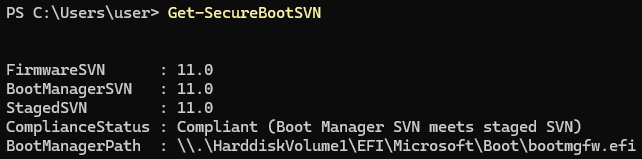
On the Dell, Step 3 logged event 1037 (“Secure Boot Dbx update to revoke Microsoft Windows Production PCA 2011 is applied successfully”) and cleared AvailableUpdates back to 0. Step 4 (0x200) logged event 1042 within 30 seconds, with no restart needed for the write and no BitLocker prompt. Get-SecureBootSVN then reported FirmwareSVN 11.0, BootManagerSVN 11.0, and Compliant.
On the VMs, three readings of the cmdlet showed the progression. FirmwareSVN was 0.0 after Steps 1 and 2, 5.0 after Step 3 alone, and 11.0 after Step 4. The cmdlet was right every time. The version screens below show other numbers because they report per file.
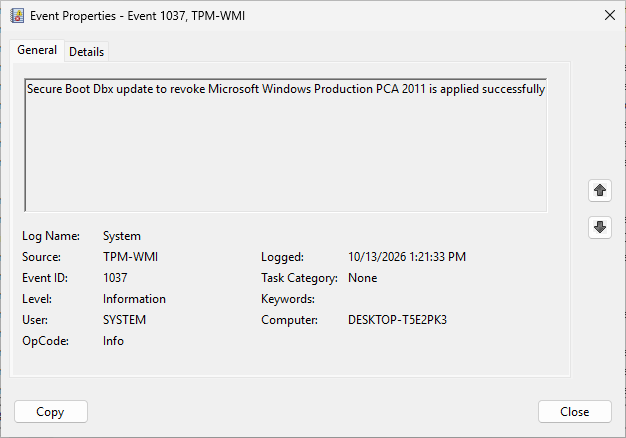
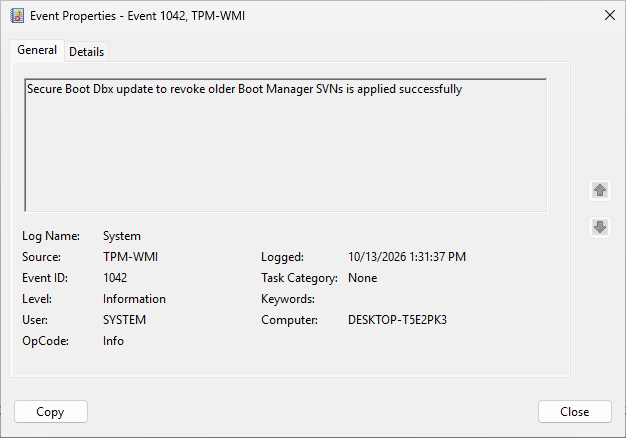
What the two steps leave in the firmware is small. I read the DBX with Get-SecureBootUEFI dbx and parsed it as signature lists. A Step 3 device’s DBX holds the PCA 2011 certificate as one X509 entry. It holds the floors as one three-entry list, with boot manager 5.0 plus 3.0 each for the PXE loader and the DVD boot stub. Together they add 1,715 bytes on top of the DBX hash lists the device already had.
Each Step 4 run then appends one single-entry list with the boot manager’s SVN of the day, 11.0 and then 12.0 on a VM that ran it twice. The firmware drops the 3.0 entries that each Step 4 payload carries again, nothing ever removes the 5.0, and Get-SecureBootSVN reports the highest.
Note
Microsoft’s guidance says Step 3 requires the 2023 certificate on the device and Step 4 requires the current cumulative update. My lab showed that the current cumulative update is needed in the boot image before Step 3, for a reason the next section explains.
Boot tests after Step 3
With Step 3 applied and nothing changed on the Configuration Manager side:
| Boot file | Result |
|---|---|
Task sequence media, PCA 2011 (bootx64.efi from an unswapped image) | Refused immediately. The Dell dropped into SupportAssist diagnostics |
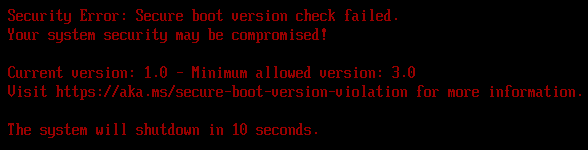
| PXE, 2023 checkbox on, unpatched ADK image | The network boot program ran and stopped: “Secure boot version check failed. Current version: 1.0 - Minimum allowed version: 3.0”, shutdown in 10 seconds |
| USB WinPE, 2023 boot manager at SVN 11.0 (patched) | Booted |
| PXE from the patched, reloaded image | Booted |
The second row matters most. When I ran these tests, every write-up I had found, including Microsoft’s, said Step 3 needs a 2023 signature and only Step 4 cares about the version. Yet a device with only Step 3 refused the supported ADK’s 2023-signed PXE loader by version.
Which file prints the version screen
A PXE boot involves two firmware-verified files in sequence, the network boot program wdsmgfw.efi and then the boot manager bootmgfw.efi. The “1.0 vs 3.0” number doesn’t belong to the boot manager. The ADK boot manager reports Security Version Number 2.0 in its resource, and the same device with Step 4 showed “2.0 vs 11.0” for that same boot manager from USB.
The responder log shows where it comes from. On the “1.0 vs 3.0” boot, the client fetched wdsmgfw.efi (1,093,280 bytes, the ADK’s 2023 PXE loader) and never requested bootmgfw.efi. The PXE loader printed the screen, failing its own check, before the boot manager was ever downloaded.
To separate the two cleanly, I mixed the staged folder by hand. I put the current cumulative update’s wdsmgfw.efi next to the ADK’s 2023 bootmgfw.efi. On that boot, the NBP was accepted, “Press ENTER for network boot service” appeared, and the boot manager downloaded at 2,756,232 bytes. Then the screen read:
Current version: 2.0 - Minimum allowed version: 11.0
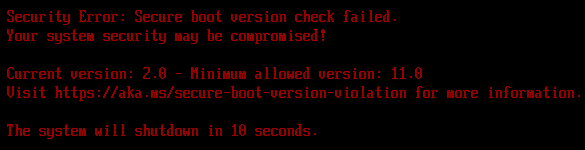
Every “Secure boot version check failed” screen belongs to the file that printed it. The first number is that file’s own version. 1.0 is always the ADK’s PXE loader. Any other number is the SVN of the update era the file came from:
| First number | The file came from |
|---|---|
| 1.0 | The ADK 10.1.26100 wdsmgfw_EX.efi, the PXE loader, whatever the month: the 2023 checkbox on an unpatched image, or the ADK’s _EX files swapped in without the update. Always “1.0 vs 3.0”, on Step 3 and Step 4 devices alike |
| 2.0 | The Windows 11 24H2 release build: the ADK’s bootmgfw_EX.efi behind a current PXE loader, or USB media built from the unpatched ADK |
| 3.0 | The July to December 2024 updates. In my lab, the December 2024 ADK’s bootmgr.efi at the root of a MakeWinPEMedia /bootex ISO, booted as a DVD (see the patching post) |
| 5.0 | January to May 2025 |
| 6.0 | The May 28th, 2025 preview to June 2025 |
| 7.0 | July 2025 to March 2026, the longest run at 24 updates, so the likeliest number on an OS image nobody has serviced lately |
| 8.0 | April to May 2026 |
| 9.0 | June to August 2026. In my lab, Windows Server 2025’s RemInst\boot_EX files in a WDS boot folder, and an August 2026 OS image at the first restart of a task sequence |
| 11.0 | September 2026. In my lab, a September boot image, ISO, or OS image on a device where Step 4 was re-run on October builds |
| 12.0 | October 2026 |
The boot manager SVN history lists every update in detail. The moment the screen appears tells you which file printed it:
- Before the “Press ENTER” prompt, it is the PXE loader.
- After the prompt, over PXE or from USB, it is the boot manager.
- From a DVD, it is the
bootmgr.efiat the ISO root. - At the first restart after Apply Operating System, it is the boot manager
bcdboottook from the OS image.
The second number is the device’s floor for that file. It is 5.0 after Step 3 alone, and after Step 4 it is the SVN that Step 4 wrote (11.0 on September builds, 12.0 after a re-run on October builds). The PXE loader’s 3.0 reads the same on Step 3 and Step 4 devices because it is a separate, fixed entry in what Step 4 writes.
A common Security Version Number reader tool (cjee21’s Get-BootMgrSecurityVersion) finds nothing in wdsmgfw.efi. That is why earlier write-ups, including my own notes, said the PXE loader “carries no SVN”. There is nothing for the tool to find, because the file has no SVN resource at all and its number is compiled in.
What the PXE loader checks against is readable, though. Step 4 writes the update’s SVN payload (C:\Windows\System32\SecureBootUpdates\DBXUpdateSVN.bin) into the firmware. That payload carries three floors, each tied to a component: the boot manager’s SVN, 3.0 for the PXE loader, and 3.0 for the DVD boot stub.
The two 3.0 entries have been in every payload since the first one in July 2024. That is why “1.0 vs 3.0” reads the same on every revoked device, and why the DVD stubs of both ADKs pass.
That leads to a few practical points:
- Step 3 alone enforces the PXE loader’s floor of 3.0, and a boot manager floor of 5.0. KB5025885 documents the 5.0 for devices with an April 2026 or later update. The Step 3-only VM showed it. With the current PXE loader in front, the ADK’s 2.0 boot manager stopped with “2.0 vs 5.0”.
- The current cumulative update’s PXE loader passes that check, and its boot manager passes any floor Step 4 can have written. Ship both from the same patched WinPE and the question goes away.
- The first number tells you which file to fix. 1.0 means the PXE loader is the ADK one. Anything else is an update era, and the moment names the file.
Boot tests after Step 4
| Boot file | Result |
|---|---|
| PXE from the patched image (SVN 11.0) | Booted. The responder served the 3,087,200-byte boot manager |
| USB WinPE at SVN 11.0 | Booted |
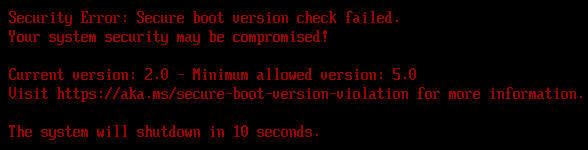
USB WinPE at SVN 2.0 (the bootbins trap from the patching post) | “Current version: 2.0 - Minimum allowed version: 11.0” |
| The same WinPE ISO as a virtual DVD | “3.0 vs 11.0” from the ISO root’s bootmgr.efi, which a DVD boot runs instead of bootx64.efi |
| PXE, 2011 loaders (WDS rolled back, or the responder with the checkbox off on an unswapped image) | Silent refusal: NBP downloaded, no prompt, back to the boot list (on Hyper-V, straight on to the next boot entry) |
PXE, Windows Server 2025 boot_EX copies | “Current version: 9.0 - Minimum allowed version: 11.0” (the Step 3-only VM booted them) |
| Task sequence media from the swapped image, from USB | Booted into the task sequence wizard |
| The same task sequence media ISO as a virtual DVD | Silent refusal (PCA 2011 El Torito loader). Booted once rebuilt with efisys_EX.bin |
| A September 2026 ADK ISO built as documented, as a virtual DVD | Booted WinPE (its root bootmgr.efi is SVN 11.0). After Step 4 was re-run on October builds: “11.0 vs 12.0” |
| The Windows 11 26H2 install ISO (September 2026) as a virtual DVD | Silent refusal: PCA 2011 throughout. Current install media can’t start Setup on a revoked device |
Step 4 changes nothing for a fleet whose boot images and media are already at the current update. What it changes is every month after it, as the next section shows.
What moves the Step 4 floor
I assumed each cumulative update that raises the boot manager’s SVN would raise the floor with it, so media would have to be patched before the update reached the devices. The update does not move the floor. The October 2026 update ships the boot manager at SVN 12.0. I took the Dell and the Steps 3 and 4 VM, both at floor 11.0, through everything that might move the floor, and I read Get-SecureBootSVN after each step:
| After | FirmwareSVN |
|---|---|
| A PXE boot of the October boot manager into WinPE | 11.0 |
| The October update, its servicing task and a restart | 11.0 |
| Windows starting from the October boot manager on disk | 11.0 |
AvailableUpdates = 0x200 again (Step 4 re-run) | 12.0, event 1042 within 30 seconds |
The Dell and the VM gave the same result. Between the update and the re-run, the cmdlet reports BootManagerSVN 12.0 against FirmwareSVN 11.0 and calls the device Not compliant (Firmware does not match boot manager). The re-run needed no restart, and the Dell’s BitLocker never prompted. The Step 3-only VM stayed at 5.0 throughout.
For the monthly routine, this means nothing raises the floor behind your back, so the WinPE patch isn’t racing the update. The floor moves when you re-run Step 4. After each update that raises the SVN, patch WinPE, rebuild media, bring the OS images up to the new SVN (next section), and then re-run Step 4.
That isn’t every month. The SVN rose in four of the first ten months of 2026, and the SVN history lists every rise. Until the re-run, Step 4 devices report Not compliant, and that’s expected.
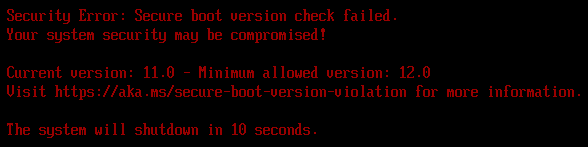
Once the floor moves, last month’s files are refused the usual way. At 12.0, the September boot image over PXE and the September 2026 ADK’s ISO as a virtual DVD both stopped with this screen:
Deploying Windows to a revoked device
Can a task sequence still deploy Windows to a device with Step 3 or Step 4? A Windows image carries both boot managers, PCA 2011 and 2023, and Configuration Manager 2609’s Apply Operating System step runs bcdboot without /bootex:
Executing command line: "bcdboot.exe" C:\WINDOWS /s S:\ /f UEFI /l en-US with options (0, 4)
I expected the 2011 boot manager on the disk and a silent refusal at the first restart. Instead, bcdboot copied the image’s 2023-signed boot manager to the EFI partition on all three VMs, including the one that never had Step 3. The problem was the version, not the signature. The task sequence applied August 2026 media, whose boot manager is SVN 9.0:
| Device | Floor | First restart after Apply Operating System |
|---|---|---|
| Steps 1 and 2 | none | Booted into the new OS |
| Step 3 only | 5.0 | Booted into the new OS |
| Steps 3 and 4, re-run on October builds | 12.0 | “Current version: 9.0 - Minimum allowed version: 12.0” |
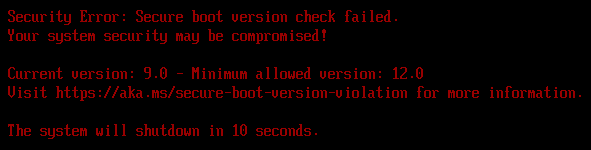
On a Step 4 fleet, the OS images your task sequences apply need the floor’s SVN as well. On a Step 3 device the bar is 5.0, which any image serviced with an update from January 2025 on reaches. On October 16th, 2026, Microsoft’s newest media were the September refresh of 25H2 and the 26H2 release. Both carry SVN 11.0, which a 12.0 floor refuses too. Service the image with the month’s cumulative update before re-running Step 4.
The servicing step works as expected. DISM /Add-Package with the October update, run on the one index my task sequence applies, took the image’s boot manager to SVN 12.0 and grew the WIM by 2.8 GB. The same task sequence on the 12.0 VM then started Windows at the first restart, where the August image had been refused. The new OS read Get-SecureBootSVN 12.0 on all three lines, Compliant, with nothing to re-run.
There is one console quirk. The image’s Images tab keeps the old build until you click Reload, and the ImageOSVersion property never changes, so check the build with DISM.
Why bcdboot chose the 2023 file is in its own log. Run with /v, it names its reason. On the Step 3 VM, it logged “Using files signed with 2023 cert, because 2011 PCA is revoked”. On the VM with no revocation, the reason was the 2023 CA in the firmware DB. A VM I had deliberately started from the PCA 2011 boot manager gave the same answer, so the boot image WinPE came from plays no part.
The firmware decides, and /bootex is on by default. Only /offline hands the choice to the /bootex switch, and without the switch it writes the PCA 2011 files. That is why /offline never belongs in a task sequence step.
Reading a failed PXE boot
By the end of the tests the Dell had shown every way a PXE boot can fail, and they are easy to tell apart:
| What you see | What it means | In the server log |
|---|---|---|
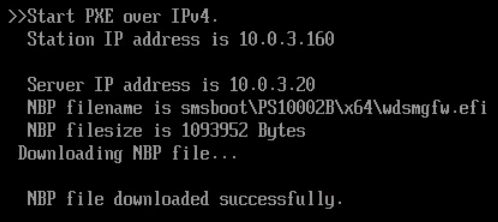
| “NBP file downloaded successfully”, then on to the next boot entry with no prompt (a machine with an OS on disk just starts Windows) | The firmware refused the network boot program’s signature: a 2011 loader on a Step 3 device, or a 2023 loader on a device that doesn’t trust the 2023 CA | A completed transfer for wdsmgfw.efi, then nothing |
| Red “Secure boot version check failed” with two numbers | The file that printed it is below its version floor | Transfers up to and including that file |
| “PXE-E23: Client received TFTP error from server” | The offered file does not exist on the server | Nothing at all (WDS), or a failed open |
Silent refusals are the ones that generate help desk tickets with no information in them. The responder log or the WDS 4100 events are where the information is. This one is a Hyper-V VM. The Dell’s screen reads the same, and a second later the VM was booting Windows from its disk.
Should you apply Step 3 at all right now?
As of October 2026, the answer depends on what recovery tooling you rely on. Microsoft’s position is to apply the mitigations and update media now. No enforcement date has been announced, and KB5025885 promises six months’ notice before enforcement begins.
The OEMs are less aligned. HP does not recommend Step 3, and its Sure Recover and Cloud Recovery images are still PCA 2011-signed. HP targets 2023-signed images for models still in production by April 2027. Dell lists its own recovery tools, Windows Recovery, WinPE, WDS, and MDT among what the revocation breaks, with no reversion. Lenovo has published no position. The tracker keeps their current status.
BlackLotus is a real threat, and the 2011-signed boot managers it exploits keep booting until Step 3 lands. But a Step 3 device can only be recovered with 2023-signed media. For an HP or Dell fleet, that means your own Configuration Manager or WinPE media, not the vendor’s. Before Step 3, make sure of the following:
- Steps 1 and 2 complete on every target device (
UEFICA2023Status = Updated), verified in inventory. Devices that can never get there are excluded by construction. - The boot image patched with the current cumulative update and the swap done. The 2023 signature alone is not enough. The table above shows what the unpatched ADK does on a Step 3 device, and the Step 3 floor of 5.0 rules out its boot manager as well.
- Task sequence media rebuilt from the swapped image and tested the way it will be booted (an ISO as a DVD checks two files a USB stick never touches). Every piece of third-party boot media (backup agents, encryption pre-boot, and OEM recovery partitions) either tested on a Step 3 pilot or explicitly out of scope.
- Every Windows installation on multi-boot devices updated. KB5025885 warns that one without a July 2024 or later update may not start after the revocation.
- BitLocker recovery keys escrowed, and a per-model pilot planned.
- A written decision from whoever owns the fleet, choosing between closing the hole now with your own recovery media or deferring Step 3 until the vendor tooling catches up.
Step 4 is a separate decision again, and a monthly commitment. WinPE, media, and OS images have to be brought up to each new SVN before Step 4 is re-run. Take it on only once the WinPE patch has run cleanly for at least two cycles and has an owner. Each re-run leaves anything below the new floor unbootable, including the OS image a task sequence applies.