Most of what has been written about the 2026 Secure Boot certificate expiry is about getting the new certificates onto devices. The registry trigger, the Intune policy, and the reporting options are all well covered. This series of posts is intended to cover the deployment side of the process, which I feel has not been covered as well. Specifically, it covers what happens to PXE, boot images, and task sequence media once devices start trusting the new certificates and, later, refusing the old ones.
I found that Microsoft’s own guidance on this topic is not very detailed when it comes to PXE, WDS, and Configuration Manager. I’ve recently spent time working through the deployment process in my lab. My goal was to create a more detailed source of documentation for this topic.
Every claim in the series comes from something I booted. The file sizes, log lines, and screenshots are included so you can compare them against your own environment. This post is the overview. The deep dives linked below cover each piece in detail. If you only want the steps, jump to the order of operations.
The three certificates and the four steps
Three Microsoft certificates anchor Secure Boot on almost every UEFI PC. Two of them expired in June 2026 and the third expired on October 19th, 2026:
| Certificate | Role | Replacement |
|---|---|---|
| Microsoft Corporation KEK CA 2011 | Authorizes updates to the DB and DBX | Microsoft Corporation KEK 2K CA 2023 |
| Microsoft Corporation UEFI CA 2011 | Signs third-party boot components (option ROMs, Linux shim) | Microsoft UEFI CA 2023, Microsoft Option ROM UEFI CA 2023 |
| Microsoft Windows Production PCA 2011 | Signs the Windows boot manager | Windows UEFI CA 2023 |
Nothing visible happens at expiry. Firmware has no trusted clock, so an expired certificate in the DB still validates everything it ever signed. Expiry only limits what Microsoft can sign from now on. In practice, a device that never gets the 2023 certificates stops receiving boot manager updates and DBX revocations. It also cannot boot media signed with the new certificate.
Windows applies the change through the Secure-Boot-Update scheduled task, driven by a registry bitmask (AvailableUpdates under HKLM\SYSTEM\CurrentControlSet\Control\SecureBoot). KB5025885 describes it as four steps:
| Step | What it does | Bit | Breaks 2011-signed media? |
|---|---|---|---|
| 1 | Adds Windows UEFI CA 2023 to the firmware DB | part of 0x5944 | No |
| 2 | Installs the 2023-signed boot manager on the EFI partition | part of 0x5944 | No |
| 3 | Adds Windows Production PCA 2011 to the DBX: the device now refuses every 2011-signed boot manager. With an April 2026 or later update it also sets a boot manager SVN floor of 5.0 | 0x80 | Yes. Only a firmware factory-key reset undoes it |
| 4 | Writes the installed boot manager’s Security Version Number (SVN) to the firmware as a floor, plus a fixed 3.0 floor for the PXE loader and the DVD boot stub. The floors stay put until Step 4 is run again. Older 2023-signed boot managers are refused too | 0x200 | Yes, and old 2023 media as well |
Steps 1 and 2 are the certificate refresh, and every device needs them. Since January 2026 the monthly cumulative update applies them automatically to hardware Microsoft has confidence in. Steps 3 and 4 are the BlackLotus (CVE-2023-24932) revocations. They are optional hardening, and they are the steps that break boot media. Microsoft has not announced an enforcement date.
What the firmware checks
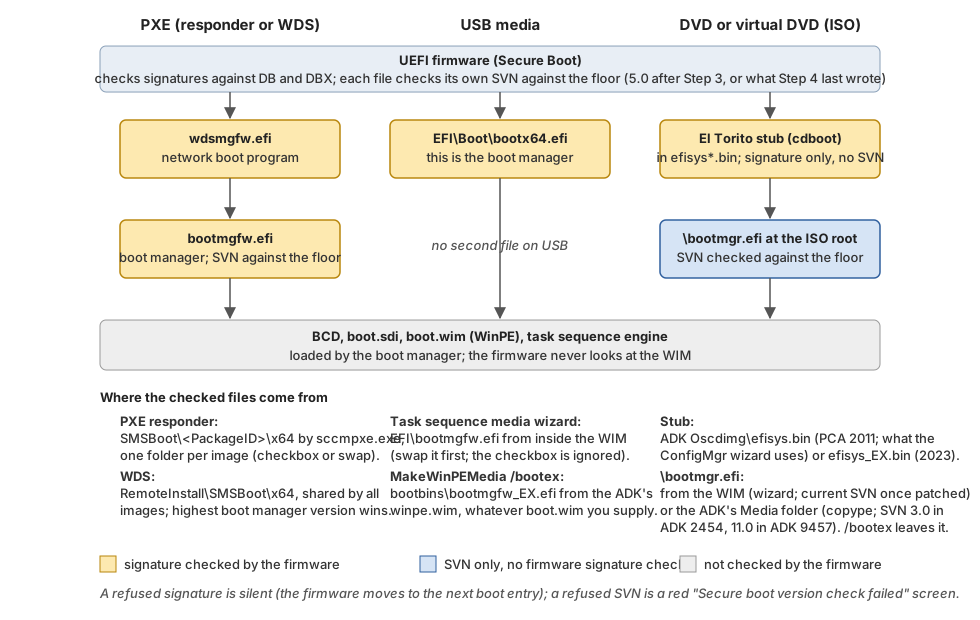
When a device PXE boots, the firmware checks two files against its DB, DBX, and SVN floor:
- The network boot program,
wdsmgfw.efi. - The boot manager,
bootmgfw.efi, that the network boot program hands off to.
From USB there is only one file, EFI\Boot\bootx64.efi, which is the boot manager itself. Everything after that (the BCD, boot.sdi, the WinPE WIM, and the task sequence engine) is loaded by the boot manager, not by the firmware. So:
- The WinPE image itself does not need to be 2023-signed for the firmware’s sake. In my lab, an unpatched WIM booted behind patched loaders, and a patched WIM failed behind unpatched ones.
- The files the firmware checks come from wherever your PXE server or media stages them, which is not always the WIM you may think it is. That is what most of this series is about.
- The two PXE files are checked separately, and each one prints its own error if it fails. The checkbox post shows both failures on screen, and the Steps 3 and 4 post explains how to read the numbers.
- An ISO booted as a DVD, including a Hyper-V virtual DVD, checks two different files. Configuration Manager’s own CD/DVD sets fail that check on a Step 3 device, even when the same ISO boots fine from a USB stick. The patching post explains the cause and the fix.
The series uses these names:
- PXE loader -
wdsmgfw.efi, Microsoft’s network boot program, which the client screen calls the NBP. - Boot manager -
bootmgfw.efi, which media carry asEFI\Boot\bootx64.efi. - Floor - the lowest version the firmware will run, written by Steps 3 and 4.
Note
Firmware trust is per device, and the PXE server cannot tell devices apart. The boot image you serve determines the outcome for every device that uses it. A device that has never had Step 1 refuses a 2023-signed image. A device with Step 3 refuses a 2011-signed one. The reference post has the full “who can boot what” matrix.
Where Configuration Manager stages the two files
The ADK’s winpe.wim has carried both signatures since version 10.1.26100.1. Inside Windows\Boot there is EFI\bootmgfw.efi (PCA 2011) next to EFI_EX\bootmgfw_EX.efi (Windows UEFI CA 2023), and PXE\wdsmgfw.efi next to PXE_EX\wdsmgfw_EX.efi. What a client receives depends on which copy Configuration Manager extracts and where it puts it:
| PXE type | Where the loaders live | How to get the 2023 copies served |
|---|---|---|
| PXE responder (WDS-less, available since 1806) | <ConfigMgr install>\bin\X64\SMSBoot\<PackageID>\x64\, one folder per boot image | The 2509+ checkbox Use Windows Boot Loader signed with Windows UEFI CA 2023 on the boot image, or the in-WIM swap |
| WDS-based PXE | RemoteInstall\SMSBoot\x64\, one folder shared by every boot image | The in-WIM swap only. The checkbox does nothing here |
| Task sequence media | EFI\Boot\bootx64.efi and EFI\Microsoft\Boot\bootmgfw.efi on the media | The in-WIM swap only. The media wizard ignores the checkbox. ISOs booted as DVDs need one more fix |
Standalone WinPE media (MakeWinPEMedia) | The same locations | /bootex, with the fixes in the patching post |
The checkbox updates PXE only on distribution points (DPs) using the responder. The in-WIM swap, which replaces EFI\bootmgfw.efi with the _EX file inside the WIM, fixes PXE on both DP types and USB media at once. That is why the patching post makes it a standard step.
Why the signature is not enough
There is a second dimension. Every 2023-signed boot manager carries a Security Version Number. The ADK 10.1.26100 ships its 2023 boot manager at SVN 2.0, and that includes the September 2026 ADK. Cumulative updates raise the SVN, though not every month. It was 11.0 in September 2026 and 12.0 in October, and the SVN history has the current value and every past rise.
A device that has run Step 4 refuses anything below its floor. Step 3 sets a floor of 5.0, which is already above the ADK’s 2.0. My lab work also showed something Microsoft’s guidance does not spell out. The ADK’s 2023-signed PXE loader fails its own version check on a device that has only had Step 3.
What each step requires of the two boot files:
| The device has | The PXE loader and the boot manager must be |
|---|---|
| Steps 1 and 2 | 2023-signed |
| Step 3 | 2023-signed and patched: a Step 3 device enforces 3.0 on the PXE loader and 5.0 on the boot manager, which the ADK’s own 2023 files fail and any cumulative-update-patched WinPE clears. These floors never move |
| Step 4 | 2023-signed and at or above the SVN Step 4 last wrote, which rises each time Step 4 is re-run |
The only way to get a current SVN into a boot image is to apply the monthly cumulative update to the ADK’s winpe.wim. With Step 4, the WinPE patch becomes a monthly task rather than a one-time job. Installing a newer ADK does not do it for you. The September 2026 ADK ships the same unpatched winpe.wim as the December 2024 release, and installing it replaces the one you patched.
The order of operations
This is the sequence that worked in my lab and that the deep dives walk through:
- Finish Steps 1 and 2 on the fleet first, or at least know how many devices don’t yet trust Windows UEFI CA 2023. Those devices stop PXE booting the moment the boot image switches to 2023. Newer models ship with the 2023 CA, Step 1 or not. A second boot image from an unswapped
winpe.wim, on its own deployment, keeps those devices imaging on the responder, but not on WDS. (See the checkbox post.) - Patch the ADK
winpe.wimwith the current cumulative update and swap the two boot files inside it. (See Patching winpe.wim and Task Sequence Media in 2026.) - Switch PXE to the 2023 loaders and propagate the patched image. On the responder, check the box and run Update Distribution Points with Reload. (See Using the ConfigMgr 2023 Boot Loader Checkbox.) On WDS, the swap is all you need, and the shared loader folder has rules of its own. (See Secure Boot 2023 on WDS-Based Distribution Points.)
- Verify at the layer the client consumes: the staged folder, the responder log byte counts, and one real PXE boot. Not the WIM, and not the
X:drive inside WinPE. - Rebuild task sequence media from the swapped image.
- Only then consider Step 3, and only after reading what it breaks. (See Testing KB5025885 Steps 3 and 4.)
- With Step 4, add the OS images and a re-run whenever the SVN rises. The floor stays where Step 4 put it until you run Step 4 again. Patch WinPE every month. After each update that raises the SVN, also rebuild media, service the OS images your task sequences apply, and then re-run Step 4. The OS images matter because a task sequence puts the image’s own boot manager on the disk. The SVN rose in four of the first ten months of 2026, and the SVN history lists every rise. (See what moves the Step 4 floor.)
Important
Upgrades undo the patch. Installing a new ADK replaces your patched
winpe.wim. The Configuration Manager site upgrade that follows rebuilds the default boot images from it and pushes them to your PXE distribution points by itself. A site server move, or a reload from a console whose SMS Provider has an unpatched ADK, does the same. Repeat step 2 after every ADK upgrade, before the site upgrade. The patching post has the order that avoids it.
The whole chain, with the files the firmware checks on each path:
Tooling versions
| Component | Use | Why |
|---|---|---|
| Windows ADK and WinPE add-on | 10.1.26100.9457 (September 2026), or 10.1.26100.2454 (December 2024) with the latest ADK patch | Both ship the byte-identical winpe.wim, with the 2023-signed files at an old SVN, so the series applies to both. ConfigMgr supports 9457 on 2509 and later |
| ADK 10.1.28000.1 | Windows 11 26H1 Arm64 only | Not supported by ConfigMgr |
| Configuration Manager | 2509 or later | Adds the boot loader checkbox. 2603 and 2609 add nothing further for Secure Boot. 2503 went out of support on September 30th, 2026 |
| WDS | Migrate away | The role, PXE included, is deprecated from the next Windows Server release (announced in September 2026, with no removal date yet). ConfigMgr PXE on WDS still works, but the checkbox does not |
What is in the series
- Using the ConfigMgr 2023 Boot Loader Checkbox - what the checkbox changes (a package flag and one staging folder), what it does not change (the WIM and media), and how to prove what a client received from the responder log.
- Secure Boot 2023 on WDS-Based Distribution Points - why they behave differently from the responder, the rule that decides which loader every client gets, how to roll it back, and how to switch the DP to the responder.
- Patching winpe.wim and Task Sequence Media in 2026 - the cumulative update procedure with the common pitfalls, and why the in-WIM swap fixes media.
- Testing KB5025885 Steps 3 and 4 - what a device refuses after each revocation step, how to read the “Secure boot version check failed” screen, what moves the Step 4 floor, what happens when a task sequence deploys Windows to a revoked device, and what the OEMs say about applying Step 3 at all.
- Reference and Troubleshooting - the “who can boot what” matrix, the version screen decoder, the verification commands, file sizes and hashes, and a symptom table.
- SVN History and Release Tracker - every boot manager Security Version Number since 2024 and the other values that change every month.
Scope and test setup
This series is about the boot side only. Deploying the certificates with Intune, Group Policy, or a Configuration Manager baseline is covered well elsewhere, as are the Autopatch report and the HP SBKPFV3 firmware gate. I don’t repeat them here.
I tested everything in September and October 2026 on:
- Two Configuration Manager sites, one serving PXE with the responder and one with WDS, both upgraded from 2603 to 2609 during the tests.
- The December 2024 ADK (10.1.26100.2454) and the September 2026 ADK (10.1.26100.9457), with the September and October 2026 cumulative updates.
- A Dell laptop taken through all four KB5025885 steps while the boot images changed underneath it, then through the October 2026 update and a second run of Step 4.
- Three Hyper-V VMs cloned from one image and left at Steps 1 and 2, Step 3 only, and Steps 3 and 4. I booted them over PXE and from ISOs as virtual DVDs, and imaged them with a Configuration Manager task sequence.
Where a result comes from a single device or server, the post says so.