This is the third deep dive in the Secure Boot 2023 and ConfigMgr Boot Images series. Both of the PXE posts end at the same place. The boot image needs the current cumulative update inside it, and the two 2023-signed boot files need to be swapped into the standard locations.
I tested the procedure on a workstation and on both of my lab site servers with the September 2026 cumulative update, KB5129195. I ran it again with the October 2026 update (KB5127648) on one of the servers. The tests ran on both the December 2024 ADK (10.1.26100.2454) and the September 2026 ADK (10.1.26100.9457).
Both ADKs ship the identical winpe.wim, still build 10.0.26100.1 with its boot managers at SVN 2.0, so everything below applies to either.
Patch the ADK’s winpe.wim, not the ConfigMgr copy
Configuration Manager regenerates <image>.<PackageID>.wim from its source on many property changes, such as drivers, optional components, or a reload. Anything you patch into that file gets dropped the next time the boot image properties are modified.
Patch the ADK’s own Windows Preinstallation Environment\amd64\en-us\winpe.wim in place instead. The Reload this boot image with the current Windows PE version from the Windows ADK option in the Update Distribution Points wizard then propagates it. The reload re-applies the drivers from the Drivers tab and skips optional components already present in the WIM.
Keep a .bak of the ADK file, and patch it on every machine whose ADK Configuration Manager might read. That means the site server, a passive site server if you have one, and every SMS Provider host. The last section explains why.
What the cumulative update changes under Windows\Boot
Before the procedure, this is what the update does to the image. The ADK 10.1.26100 winpe.wim already carries both signatures side by side, at an old Security Version Number. The cumulative update raises the versions but does not change which file is where. The table shows September 2026. Each later update moves the same files, and the tracker has the current values:
| File | ADK | After the September 2026 CU | Signer |
|---|---|---|---|
EFI\bootmgfw.efi | 10.0.26089.1001, SVN 2.0 | 10.0.28000.367, SVN 11.0 | PCA 2011, unchanged |
EFI_EX\bootmgfw_EX.efi | 10.0.26089.1001, SVN 2.0 | 10.0.28000.367, SVN 11.0 | Windows UEFI CA 2023, unchanged |
PXE\wdsmgfw.efi | 10.0.26100.1 | 10.0.26100.30227 | PCA 2011 |
PXE_EX\wdsmgfw_EX.efi | 10.0.26100.1 | 10.0.26100.30227 | Windows UEFI CA 2023 |
EFI_EX\bootmgr_EX.efi | present | removed | |
EFI\bootmgr.efi | ADK build | 10.0.28000.367, SVN 11.0 | PCA 2011, no 2023 variant. ConfigMgr puts it at the root of ISOs, where a DVD boot runs it (see the media sections) |
memtest.efi, SecureBootRecovery.efi, kd*.dll | updated | PCA 2011, no 2023 variant |
After the update, everything under EFI\ and PXE\ is still PCA 2011-signed. Only bootmgfw.efi and wdsmgfw.efi have 2023 counterparts, and they are the only files the firmware verifies on a PXE or USB boot. A DVD boot checks two other files, covered below. The swap at step 6 copies those two _EX files over the standard ones.
If you have a script from 2024 or 2025 that also copies bootmgr_EX.efi, it will break. That file has been gone since the May 2026 preview update. An image serviced before then still has it, and one serviced since does not.
The procedure
Run from an elevated PowerShell on the machine with the ADK. Use the ADK’s dism.exe, not the operating system’s. It is the one Microsoft documents for WinPE, and the one I used in my testing. Put the cumulative update .msu and its checkpoint .msu (for 24H2, 25H2, and 26H2 that’s KB5043080) in a folder with nothing else in it.
# 0. Variables
$Adk    = 'C:\Program Files (x86)\Windows Kits\10\Assessment and Deployment Kit'
$Dism   = "$Adk\Deployment Tools\amd64\DISM\dism.exe"
$Wim    = "$Adk\Windows Preinstallation Environment\amd64\en-us\winpe.wim"
$Oc     = "$Adk\Windows Preinstallation Environment\amd64\WinPE_OCs"
$Mount  = 'C:\Temp\WinPEMount'
$Cu     = 'C:\Temp\Source\windows11.0-kb5127648-x64_<hash>.msu' # checkpoint msu in the same folder
$Export = 'C:\Temp\winpe-patched.wim'

# 1. Backup
Copy-Item $Wim "$Wim.bak-$(Get-Date -Format yyyyMMdd)" -Force
& $Dism /Get-MountedImageInfo # expect none
New-Item -ItemType Directory -Path $Mount -Force | Out-Null

# 2. Mount read-write
& $Dism /Mount-Image /ImageFile:"$Wim" /Index:1 /MountDir:"$Mount"

# 3. Optional components BEFORE the CU, in dependency order, each with its language cab.
#    Match what your boot images use. Components added later through the console are not
#    serviced by the CU. WinPE-SecureBootCmdlets has no language cab.
$components = 'WinPE-WMI','WinPE-NetFx','WinPE-Scripting','WinPE-PowerShell','WinPE-StorageWMI',
              'WinPE-DismCmdlets','WinPE-SecureBootCmdlets','WinPE-SecureStartup','WinPE-WDS-Tools'
foreach ($c in $components) {
    & $Dism /Image:"$Mount" /Add-Package /PackagePath:"$Oc\$c.cab"
    if (Test-Path "$Oc\en-us\${c}_en-us.cab") { & $Dism /Image:"$Mount" /Add-Package /PackagePath:"$Oc\en-us\${c}_en-us.cab" }
}

# 4. The cumulative update. Point at the LCU FILE; DISM finds the checkpoint beside it.
& $Dism /Image:"$Mount" /Add-Package /PackagePath:"$Cu"
& $Dism /Image:"$Mount" /Get-Packages /Format:Table # expect Package_for_RollupFix at the new build and no checkpoint package

# 5. Cleanup
& $Dism /Image:"$Mount" /Cleanup-Image /StartComponentCleanup /ResetBase

# 6. Swap the two boot files. The files are owned by TrustedInstaller.
foreach ($pair in @(@('EFI\bootmgfw.efi','EFI_EX\bootmgfw_EX.efi'), @('PXE\wdsmgfw.efi','PXE_EX\wdsmgfw_EX.efi'))) {
    $dst = "$Mount\Windows\Boot\$($pair[0])"; $src = "$Mount\Windows\Boot\$($pair[1])"
    takeown.exe /f $dst | Out-Null
    icacls.exe $dst /grant Administrators:F | Out-Null
    Copy-Item $src $dst -Force
}

# 7. Verify inside the mount: the four files should now come in identical pairs
Get-Item "$Mount\Windows\Boot\EFI\bootmgfw.efi", "$Mount\Windows\Boot\EFI_EX\bootmgfw_EX.efi",
         "$Mount\Windows\Boot\PXE\wdsmgfw.efi", "$Mount\Windows\Boot\PXE_EX\wdsmgfw_EX.efi" |
    Select-Object Name, Length, @{n='Version';e={[string]$_.VersionInfo.FileVersionRaw}},
        @{n='Signer';e={([System.Security.Cryptography.X509Certificates.X509Certificate2]::CreateFromSignedFile($_.FullName)).Issuer -replace ', O=.*$',''}}

# 8. Commit, export to compact, replace the ADK copy
& $Dism /Unmount-Image /MountDir:"$Mount" /Commit
if (Test-Path $Export) { Remove-Item $Export }
& $Dism /Export-Image /SourceImageFile:"$Wim" /SourceIndex:1 /DestinationImageFile:"$Export" /Compress:max /CheckIntegrity
Copy-Item $Export $Wim -Force
& $Dism /Get-ImageInfo /ImageFile:"$Wim" /Index:1 | Select-String '^(Size|Version|ServicePack Build) :' # ServicePack Build is the update's build, e.g. 9711 for October 2026
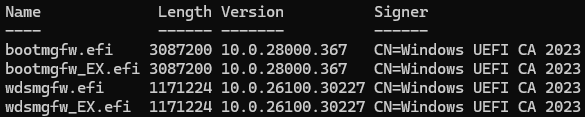
At step 7, the four files should come in two identical pairs, all signed by Windows UEFI CA 2023, at the sizes and versions of the update you applied. The tracker lists them per month. So does the file information list linked from the update’s KB page, which matched my results in September and October.
The screenshot shows September 2026, with the boot managers at 3,087,200 bytes, 10.0.28000.367, and the PXE loaders at 1,171,224 bytes, 10.0.26100.30227. The whole run takes about ten minutes of DISM time, most of it in step 4.
Then propagate the patched WIM. On the responder, check the 2023 box if you like (not necessary on a swapped WIM, see the checkbox post), and run Update Distribution Points with Reload checked. On WDS, the reload is all you need, but it has to be done on every PXE-enabled image that gets a cumulative update (see the WDS post).
Common pitfalls
Point DISM at the update file, not the folder. /PackagePath:<folder> is the documented way to install a cumulative update with its checkpoint, and it does not work for WinPE. DISM installs the checkpoint MSU standalone first and fails with 0x80070228 on its Unattend.xml. The LCU then installs anyway, so the image looks patched, but the exit code is non-zero and the run is not clean.
Point /PackagePath at the LCU file, and DISM finds the checkpoint in the same folder on its own. Don’t expect to see it afterward. On the October update, /Get-Packages listed the update and its servicing stack but no checkpoint package, because DISM reads the checkpoint as a source rather than installing it.
Optional components go in before the update. Anything added after the cumulative update, including components added later through the console’s Optional Components tab, is left at its ADK version. Put the components your images use into the ADK winpe.wim before the update. Configuration Manager detects components already in the WIM and does not add them again.
Get-AuthenticodeSignature reports the wrong signer. On a host that has the same cumulative update installed, it returns the catalog signer (PCA 2011) for a file whose embedded signature is Windows UEFI CA 2023. That happens because the file’s hash is in the host’s catalog. Its SignatureType property then reads Catalog. Read the embedded certificate with X509Certificate2::CreateFromSignedFile as in step 7, or with cjee21’s Check-UEFISecureBootVariables tools, which also read the Security Version Number out of the file.
icacls /setowner is refused. The boot files are owned by TrustedInstaller, and icacls /setowner alone does not enable the take-ownership privilege. Run takeown /f first, then icacls /grant, and then copy.
The version string is not the version. VersionInfo.FileVersion is a string-table value, and Windows substitutes the string from a neighboring .mui file when one exists. The same September 2026 boot manager reads 10.0.28000.342 inside the WIM (where a MUI sits beside it) and 10.0.28000.367 once staged for PXE, although the bytes are identical. Compare FileVersionRaw, the hash, or the SVN, never the string.
DISM’s Version line is not the image’s build. /Get-ImageInfo prints the image’s version as 10.0.26100 and its build on a separate ServicePack Build line. A filter on Version also catches DISM’s own banner, which on the September 2026 ADK reads Version: 10.0.26100.9457. That is the same number as the September WinPE build, so the filter shows the “expected” value whatever the image holds. Filter on ServicePack Build, as in step 8.
Commit, then export. A committed WIM roughly doubles in size, from 324 MB to 739 MB in my lab. /Export-Image /Compress:max brings it to about 459 MB with identical contents. Export to a temporary file and copy it over the original.
If DISM errors part way, discard and look at the log:
& $Dism /Unmount-Image /MountDir:"$Mount" /Discard
& $Dism /Cleanup-Mountpoints
Task sequence media
The Create Task Sequence Media wizard in 2603 and 2609 has no Secure Boot option and ignores the 2023 checkbox. It extracts EFI\bootmgfw.efi from the boot image WIM and writes it to EFI\Boot\bootx64.efi and EFI\Microsoft\Boot\bootmgfw.efi on the media. Media built from a checkbox-enabled but unswapped image therefore carries PCA 2011 and is refused by any device with Step 3.
Media built from a swapped image needs nothing else. I created a bootable ISO from the patched image on my lab site, mounted it, and checked:
$iso = 'C:\Temp\ts-media.iso'
$drv = (Mount-DiskImage -ImagePath $iso -PassThru | Get-Volume).DriveLetter
Get-ChildItem "${drv}:\EFI\Boot\bootx64.efi", "${drv}:\EFI\Microsoft\Boot\bootmgfw.efi", "${drv}:\bootmgr.efi", "${drv}:\sources\boot.wim" |
    Select-Object FullName, Length, @{n='SHA256';e={(Get-FileHash $_.FullName).Hash.Substring(0,8)}}
Dismount-DiskImage -ImagePath $iso | Out-Null
FullName                            Length SHA256
--------                            ------ ------
K:\EFI\Boot\bootx64.efi            3087200 25D8869E
K:\EFI\Microsoft\Boot\bootmgfw.efi 3087200 25D8869E
K:\bootmgr.efi                     3070456 0D2A3BE5
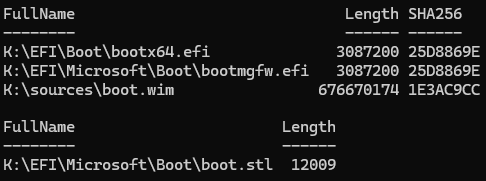
K:\sources\boot.wim              676670174 1E3AC9CC
Both boot files are the September 2026 2023-signed boot manager at SVN 11.0, the same hash as the file the PXE responder serves. The root bootmgr.efi is the WIM’s September copy too (PCA 2011-signed, SVN 11.0), and EFI\Microsoft\Boot\boot.stl (12,009 bytes) is on the media. Written to a USB stick, the Dell with Steps 1 to 4 booted straight into the task sequence wizard.
The swap fixes USB media with no extra work, which is a good reason to make it a standard step rather than a WDS-only workaround.
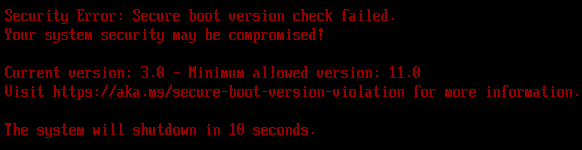
As a Hyper-V virtual DVD, the ISO was refused by the Step 3 VM and the Steps 3 and 4 VM. That happened although every boot file on it was 2023-signed at SVN 11.0. A DVD boot first runs the loader inside the ISO’s El Torito boot image, and that is the file the firmware verifies. It has a version floor of its own, 3.0, which the 2023 stubs of both ADKs pass.
The wizard builds the ISO with the ADK’s Oscdimg\efisys.bin, whose loader is PCA 2011-signed. Extracted from the ISO with 7-Zip, it hashes the same as the ADK file. The fix is to rebuild the ISO with the ADK’s 2023 image, efisys_EX.bin:
set OSC=C:\Program Files (x86)\Windows Kits\10\Assessment and Deployment Kit\Deployment Tools\amd64\Oscdimg
oscdimg -m -o -u2 -udfver102 -bootdata:2#p0,e,b"%OSC%\etfsboot.com"#pEF,e,b"%OSC%\efisys_EX.bin" "<extract>" "<out>.iso"
Mount the wizard’s ISO, copy its tree to <extract>, and rebuild. Both revoked VMs then booted the media successfully.
The El Torito loader is the only file the firmware checks on a DVD boot. It then loads \bootmgr.efi from the ISO root. The wizard takes that file from the WIM, so it is at the month’s SVN for a patched image, and its version is checked against the floor. With the swap done, nothing else on the media needs touching.
The December 2024 and September 2026 ADKs both ship a PCA 2011 efisys.bin, and the 2609 wizard still uses it. A newer ADK or site version therefore does not change what the wizard produces.
If you cannot swap inside the WIM, patch the media after the wizard instead. Replace the two EFI files on the stick with Windows\Boot\EFI_EX\bootmgfw_EX.efi from the mounted patched image. For an ISO, also replace \bootmgr.efi at the root with the patched WIM’s Windows\Boot\EFI\bootmgr.efi, and then rebuild with the command above.
The media’s bootaa64.efi and bootia32.efi are copies of the x64 file (a long-standing Configuration Manager quirk) and can be ignored. SecureBootRecovery.efi is Microsoft’s recovery tool and stays PCA 2011.
Standalone WinPE media
MakeWinPEMedia gained a /bootex switch that writes the 2023-signed boot manager to the media. On a Step 3 or Step 4 device, that is not enough. The two files that get checked come from the ADK’s own files, never from the boot.wim you put in media\sources:
| File on the media | Checked on | Where copype takes it from | What /bootex does about it |
|---|---|---|---|
EFI\Boot\bootx64.efi, the boot manager | USB | <workdir>\bootbins, copied from the ADK’s winpe.wim | Writes bootbins\bootmgfw_EX.efi: 2023-signed, but at the ADK’s SVN 2.0 unless the ADK winpe.wim was patched in place |
\bootmgr.efi at the ISO root | DVD, loaded by the El Torito loader | The ADK’s Media folder | Nothing. PCA 2011, at SVN 3.0 on the December 2024 ADK and 11.0 on the September 2026 ADK |
If the ADK winpe.wim was patched in place with the procedure above, bootbins is already current. Working from a separate patched WIM, replace both files by hand before MakeWinPEMedia:
call "C:\Program Files (x86)\Windows Kits\10\Assessment and Deployment Kit\Deployment Tools\DandISetEnv.bat"
copype amd64 C:\WinPE_amd64
copy /y C:\Temp\winpe-patched.wim C:\WinPE_amd64\media\sources\boot.wim
copy /y <mount>\Windows\Boot\EFI\bootmgfw.efi C:\WinPE_amd64\bootbins\bootmgfw.efi
copy /y <mount>\Windows\Boot\EFI_EX\bootmgfw_EX.efi C:\WinPE_amd64\bootbins\bootmgfw_EX.efi

rem ISO only: the El Torito loader boots \bootmgr.efi from the ISO root, and /bootex does not replace it
copy /y <mount>\Windows\Boot\EFI\bootmgr.efi C:\WinPE_amd64\media\bootmgr.efi

rem /bootex must be the LAST argument or the tool prints its usage and exits 0
MakeWinPEMedia /ISO /f C:\WinPE_amd64 C:\WinPE_2023.iso /bootex
Verify the result the same way as the task sequence media. Mount it and check EFI\Boot\bootx64.efi by size, embedded signer, and version. For an ISO, also check the root bootmgr.efi by version and SVN. Then boot-test the ISO as a DVD as well as from USB, because the two paths check different files.
I built each of these without the two copies and watched it fail. A patched boot.wim behind the unpatched bootbins boot manager stops from USB on a Step 4 device with “Current version: 2.0 - Minimum allowed version: 11.0”.
As a DVD, the ISO’s El Torito loader is the ADK’s 2023-signed efisys_EX.bin, which the revoked VMs accepted, and the root bootmgr.efi is checked next. The December 2024 ADK’s copy (10.0.26100.1085, SVN 3.0) fails with “3.0 vs 5.0” on a Step 3 device and “3.0 vs 11.0” on a Step 4 device, whatever bootbins holds.
The September 2026 ADK’s copy is the September update’s boot manager at SVN 11.0. It is the file Microsoft’s release note means by “boot on Secure Version Number (SVN) 9.0”. An ISO built exactly as documented booted both revoked VMs into WinPE, and it stopped with “11.0 vs 12.0” once Step 4 was re-run on October builds. Copying the patched WIM’s EFI\bootmgr.efi over media\bootmgr.efi, the extra line in the block above, fixed both ADKs.
Make it recurring
A cumulative update that raises the boot manager’s SVN makes the previous image old, but it doesn’t move any device’s floor. Only re-running Step 4 does (the Steps 3 and 4 post has the test). Once Step 4 is in place or rolling out, run this procedure monthly. In a month whose update raises the SVN, keep this order:
- Patch
winpe.wimand reload the boot images. - Rebuild task sequence media.
- Bring the OS images your task sequences apply to the same update. A task sequence puts the image’s own boot manager on the disk, so the image’s SVN decides its first restart. DISM
/Add-Packageon the image plus Update Distribution Points took about an hour in my lab, and the Steps 3 and 4 post has the result. - Only then re-run Step 4. In a month without a rise there’s nothing to re-run.
With Step 3 only, the floor stays at 5.0 and a patched image keeps booting. Quarterly is enough there, as it is for a fleet staying on Steps 1 and 2. Either way, name an owner and record the shipped version and SVN each time, because the reference post is only useful if you know what you shipped.
ADK upgrades, site upgrades, and site server moves undo the patch
Patching the ADK’s own winpe.wim has one consequence that is easy to forget. Installing a new ADK, the September 2026 release included, replaces that file with Microsoft’s unpatched image. The uninstall deletes winpe.wim even when it’s your patched copy, and it keeps only files it didn’t install, like the .bak.
Microsoft’s checklist for Configuration Manager 2609 then asks you to update the ADK before the site, so that the site upgrade rebuilds the default boot images from the new winpe.wim. If you do both, the PXE loaders go back to the ADK’s, and media built afterward carries a 2011 boot manager.
A site server move or a reload can also put the old loaders back. A site server move (a passive site server, installed and promoted) regenerated the default boot image from the new server’s ADK, which nobody had patched. The console kept showing the patched OS version.
Update Distribution Points with Reload rebuilds the image from the ADK of the SMS Provider the console uses. Through a provider with the patched winpe.wim, the staged loaders came back at 3,087,200 and 1,171,224 bytes. Through one with the original ADK, they came back at 2,756,232 and 1,093,280. I ran this a few times, and every run matched.
The SMS Provider decides which ADK gets read, not the site server. A console running on a server that hosts an SMS Provider always uses that server’s own provider, even when connected to a different site server. Its log names the provider at every launch (SmsAdminUI.log in the console’s AdminUILog folder, “Using provider on machine”).
The site upgrade picks a provider too. On my site with three providers, it rebuilt the default image through the one on the remote distribution point. CMUpdate.log names it (“Successfully updated the default boot image: \\<provider>\root\sms\…”). Microsoft requires the ADK on every SMS Provider host and assigns a console’s provider at random, so the patched file has to be on all of them.
Follow the below steps to avoid these issues:
- Copy the patched
winpe.wimand its.bakout of the ADK folder. - Install the new ADK and WinPE add-on on the site server, any passive site server, and every SMS Provider host, and then run the procedure above on each new
winpe.wim. If you script the upgrade, the old version’s own bootstrappers remove it silently, add-on first:adkwinpesetup.exe /uninstall /quiet, thenadksetup.exe /uninstall /quiet. - Upgrade the site. The default boot images are rebuilt from the patched file of whichever SMS Provider the upgrade picks. They keep the 2023 checkbox and go out to the distribution points on their own.
- Run Update Distribution Points on every boot image you use, with Reload on the custom ones, from a console on a server whose
winpe.wimis patched. The rebuilt default images still carry the previous client version until you do. - Verify the staged loaders after the upgrade and after every reload, then rebuild media.