This is the second deep dive in the Secure Boot 2023 and ConfigMgr Boot Images series. The previous post showed that the 2023 boot loader checkbox is a package flag plus one staging folder per boot image on the PXE responder. Plenty of sites still run PXE through Windows Deployment Services, and those distribution points (DPs) work differently. On a WDS distribution point, the staging folder is somewhere else, and every boot image shares it. The checkbox does nothing there.
I tested everything in this post using my lab site (Windows Server 2025, PXE enabled with WDS, unknown computer support on). The distribution point was first the site server’s own and later a remote one. I used the same Dell and Hyper-V clients as the rest of the series.
What enabling WDS-mode PXE creates
Checking Enable PXE support for clients on the distribution point, without the responder option, installs the WDS role. It initializes the role with a RemoteInstall folder on the NTFS drive with the most free space. Configuration Manager then registers smspxe.dll as the WDS PXE provider and expands the PXE-enabled boot images. The layout that appears:
| Location | Content |
|---|---|
RemoteInstall\SMSBoot\x64\ | bootmgfw.efi, wdsmgfw.efi, bootmgr.exe, pxeboot.*, wdsnbp.com, abortpxe.com. One folder per architecture, shared by every boot image. There are no SMSBoot\<PackageID> folders |
RemoteInstall\SMSBoot\arm64\ | The same pair for Arm64 images |
RemoteInstall\SMSImages\<PackageID>\ | Each boot image’s WIM, re-expanded on every content update |
RemoteInstall\SMSTemp\<date>.<n>.{guid}.boot.bcd | One BCD per PXE-enabled boot image, pointing at that image’s WIM. Its path is handed to the client in DHCP option 252 |
RemoteInstall\Boot\ | WDS’s own boot files and BCD stores. Unused by ConfigMgr clients |
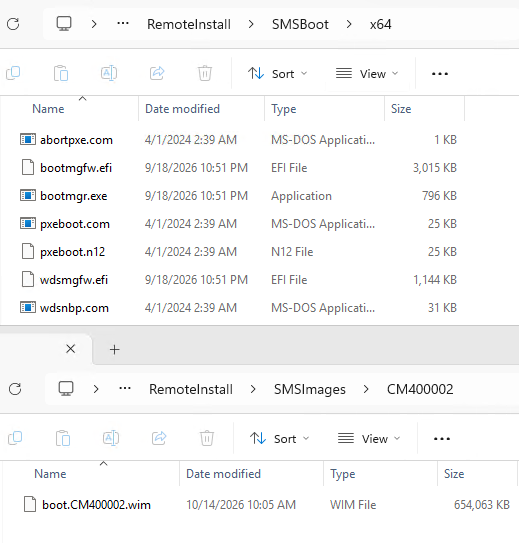
The boot chain, and which parts the deployment chooses
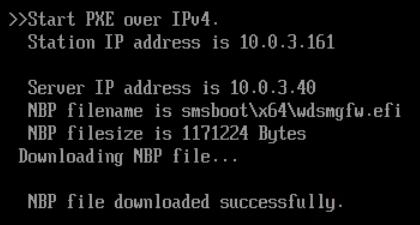
WDS does its own TFTP and logs every transfer to the Deployment Services Diagnostics Operational event channel. Event 4099 marks the start and 4100 the completion, each with the client IP, file name, and size. SMSPXE.log records the boot action and the DHCP reply, but nothing about the transfers. From those two sources, a good boot looks like this:
| Order | File | Chosen by |
|---|---|---|
| 1 | smsboot\x64\wdsmgfw.efi (the NBP the client prints on screen) | shared folder |
| 2 | \SMSTemp\<per-image>.boot.bcd | the task sequence deployment |
| 3 | \smsboot\x64\bootmgfw.efi (requested twice) | shared folder |
| 4 | \SMSBoot\boot.sdi, \smsboot\Fonts\wgl4_boot.ttf | shared |
| 5 | \SMSImages\<PackageID>\<image>.wim | the task sequence deployment |
| 6 | \SMSTemp\<per-image>.boot.var | the task sequence deployment |
The deployment decides the BCD and the WIM. The two files the firmware verifies, steps 1 and 3, come from the shared folder whichever boot image the task sequence uses. Booting confirmed what that implies:
- An unpatched WIM boots fine behind patched loaders. The firmware never looks at the WIM.
- Changing which boot image a task sequence references changes nothing about whether the firmware accepts the boot. It only changes what loads after the boot manager is already running.
Get-WinEvent -LogName 'Microsoft-Windows-Deployment-Services-Diagnostics/Operational' -MaxEvents 400 |
    Where-Object { $_.Id -in 4099, 4100 } |
    Select-Object TimeCreated, Id, @{n='Transfer';e={ ($_.Message -replace '\s+',' ') -replace '^.*Client IP:','Client IP:' }} |
    Select-Object -First 12

Note
The legacy
HKLM\SOFTWARE\Microsoft\Tracing\WDSServerfile-tracing key is ignored by WDS on Windows Server 2025. The Operational channel is where the transfers are.
The checkbox does nothing here
The console offers the 2023 boot loader checkbox on a WDS-only site, just as on the responder. Checking it sets PkgFlags bit 0x100 and starts a content update. distmgr.log shows SMSDP_ExpandPXEImage running with the new flags. The shared folder does not change. It does not change after a WDS service restart either. On WDS, the checkbox is inert.
What does work is the in-WIM swap from the patching post. Patch the ADK winpe.wim with the cumulative update, replace EFI\bootmgfw.efi and PXE\wdsmgfw.efi inside it with their _EX twins, and then run Update Distribution Points with Reload on the boot image. The provider extracts the loaders from the WIM into the shared folder, so what is inside the WIM is what gets served.
After that reload, the shared folder held the 3,087,200-byte 2023 boot manager and the 1,171,224-byte 2023 PXE loader.
Highest version wins
I put two PXE-enabled images on the DP, one patched (September 2026 boot manager, version 10.0.28000.367) and one unpatched (the ADK’s, 10.0.26089.1001). Then I tried every way I could think of to make the older image’s loaders land in the shared folder:
| Attempt | Shared folder afterward |
|---|---|
| Update Distribution Points on the unpatched image | unchanged (patched) |
| Create a new unpatched image in the console, PXE-enable, distribute | unchanged |
| Update Distribution Points on that new image | unchanged |
| Restart WDS with the unpatched image last in the provider’s load order | unchanged |
| Delete the only patched image, leaving just the unpatched one | unchanged |
| Update Distribution Points on the unpatched image again, now the only x64 image | unchanged |
In the other direction, an image with a newer boot manager replaced the shared copy immediately, regardless of the file dates on disk. I had set the shared files’ dates to 2020 to check whether the date mattered, and it did not. An equal version is left alone.
The shared folder keeps the highest boot manager version found in any PXE-enabled image. An older or equal file never replaces it, whatever its date, whatever its signer, and whatever order the images are processed in.
A re-run on the same server as a remote DP confirmed it in both directions. Re-enabling PXE on the patched image replaced a 2011 pair while the unpatched image stayed PXE-enabled.
Equal versions behave the same way, and that can leave a DP on 2011 loaders. I put two PXE-enabled images at the same October 2026 build on the DP. One was swapped and had 2023 loaders, and the other had 2011 loaders with the same version numbers.
Whichever pair was in the folder first stayed. The unswapped image never replaced the 2023 pair, and with the 2011 pair laid down first, the swapped image never replaced it either. Update Distribution Points changed nothing, and file dates made no difference.
After a WDS restart with both images present, the provider processes them in package ID order, and the lower ID’s pair lands. A DP whose shared folder came from an unswapped image at this month’s build therefore keeps serving 2011 loaders after you add the swapped one. Nothing in the console says so. The way out is the rollback below. Take PXE off every unswapped image, or swap it, and then delete the pair and restart WDS.
In practice, that means:
- One patched image lifts the whole DP, and an unpatched image cannot break it.
- Any PXE-enabled image that later receives a newer cumulative update without the swap puts a newer, 2011-signed boot manager in front of every client. Nothing warns you when that happens. On a WDS DP, every image that gets a cumulative update needs the swap, or PXE should be removed from images nobody maintains.
- Rolling back is not “revert the image”. Nothing you do in the console brings older loaders back.
Rolling back by hand
Since the console cannot lower the shared folder, rollback means deleting the files and letting the provider re-extract them:
$RemInst = (Get-ItemProperty 'HKLM:\SYSTEM\CurrentControlSet\Services\WDSServer\Providers\WDSTFTP').RootFolder
Remove-Item "$RemInst\SMSBoot\x64\bootmgfw.efi", "$RemInst\SMSBoot\x64\wdsmgfw.efi"
Restart-Service WDSServer
Start-Sleep 60
Get-ChildItem "$RemInst\SMSBoot\x64\*.efi" | Select-Object Name, Length, LastWriteTime
What happened in my lab:
- Between the delete and the restart, the provider still offers
smsboot\x64\wdsmgfw.efiin its DHCP reply, but WDS cannot open the file. The client prints “PXE-E23: Client received TFTP error from server.” Nothing re-creates the files on demand, and WDS logs nothing at all for that attempt.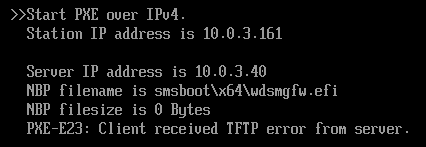
- After the restart,
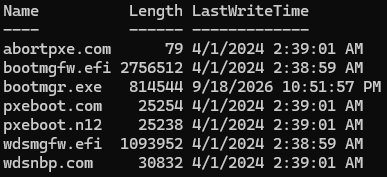
SMSPXE.logshows “Found new image” for each PXE-enabled image, and the missing files come back from the remaining image within a minute. Here they were the PCA 2011 pair, at 2,756,512 and 1,093,952 bytes. - The restored files carry the source WIM’s timestamps (April 1st, 2024 for the ADK files), not the restart time. File dates in this folder never tell you when something was staged. Compare hashes or
FileVersionRaw. - The restart only fills gaps.
bootmgr.exe, the BIOS loader, was left at the version from the deleted patched image, because it follows the same highest-version rule. Delete it too if BIOS clients matter.
This is the folder after the restart. The 2011 pair is back with the WIM’s April 2024 dates, and bootmgr.exe still carries the September date of the deleted image.
The server’s own boot_EX files
The common answer for plain WDS servers is to copy wdsmgfw.efi and bootmgfw.efi from %windir%\System32\RemInst\boot_EX\x64 into the boot folder. Those files are 2023-signed, but they are only as new as the server’s cumulative update.
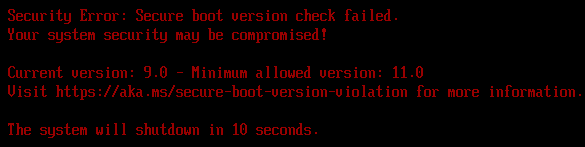
For example, on a Windows Server 2025 device with the August 2026 update, that is version 10.0.28000.352 at SVN 9.0. September’s update carries SVN 11.0 on both clients and servers. A client that ran Step 4 with the September update installed has a floor of 11.0, so it refuses the server’s August boot manager:
Take the loaders from a cumulative-update-patched WinPE instead, or bring the server to the clients’ update level first. On a Configuration Manager DP, a hand-copied file is overwritten anyway by the next boot image update that carries a newer one, per the rule above.
A device with Step 3 only is a different story. Its floor is 5.0, and the same 9.0 file booted a Step 3-only VM straight into the task sequence wizard. That shows the practical difference between the two steps. Step 3 refuses the ADK’s loaders, and Step 4 refuses everything older than the boot manager it was run with.
Switching the DP to the responder
The simplest fix for all of this is to switch the DP to the responder, especially since WDS itself is deprecated. In September 2026, Microsoft announced that the WDS server role, including the PXE boot it provides, is deprecated from the next release of Windows Server (KB5129631).
WDS stays available on Windows Server 2025 and earlier, and Microsoft says Configuration Manager OS deployment itself is not affected. Sites that still use WDS-backed PXE are told to move off it, but no removal date has been given yet.
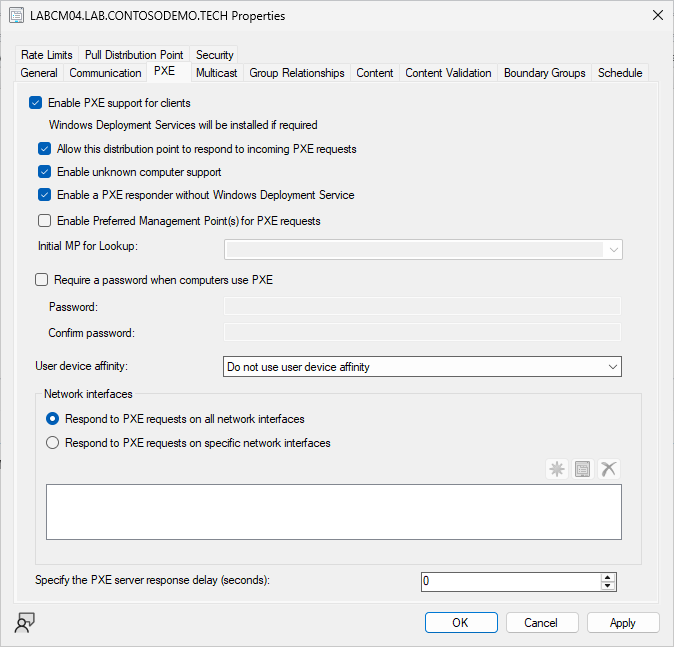
In the distribution point properties, PXE tab, check Enable a PXE responder without Windows Deployment Service and click OK. On my lab server, within two minutes:
- The
SccmPxeservice was running and set to Automatic, andWDSServerwas stopped and set to Disabled. HKLM\SOFTWARE\Microsoft\SMS\DPshowedIsPXE1 andSccmPXE1.- Per-image folders appeared under
<ConfigMgr install>\bin\X64\SMSBoot\(on a remote DP, under<drive>\SMS_DP$\sms\bin\SMSBoot\, besidesccmpxe.exe), each holding that image’s own loaders extracted from its own WIM. RemoteInstallwas left exactly as it was. Nothing cleans it up.SMSPXE.logkept writing to the same place, with the TFTP transfers now logged there with byte counts.
From that point the DP behaves as the checkbox post describes. The checkbox works, each image is independent, and rollback is a matter of unchecking a box.
I booted the same image three times after the switch. The first boot served the unpatched built-in image’s 2011 loaders and was silently refused. Checking the box produced the ADK’s 2023 loaders and the “1.0 vs 3.0” version screen. Update Distribution Points with Reload from the patched ADK then produced the current loaders and a successful boot.
Note
Right after enabling PXE or changing the DP’s PXE settings, the provider can race the distribution manager’s image expansion (
InstallBootFilesForImage failed 0x80004005, “Failed to copy the needed boot binaries”). It can also fail its management point connection (MP_InitializeTransport failed). Give it a minute, because the provider usually retries on its own. If it doesn’t, restartWDSServerorSccmPxe, whichever is running, oncedistmgr.logis idle.
Verifying a WDS DP
$Install = (Get-ItemProperty 'HKLM:\SOFTWARE\Microsoft\SMS\Identification' -ErrorAction SilentlyContinue).'Installation Directory'
$dirs    = @(if ($Install) { Join-Path $Install 'Logs' }) + @(Get-PSDrive -PSProvider FileSystem | ForEach-Object { Join-Path $_.Root 'SMS_DP$\sms\logs' })
$log     = Get-ChildItem -Path $dirs -Filter smspxe.log -ErrorAction SilentlyContinue | Sort-Object LastWriteTime -Descending | Select-Object -First 1 -ExpandProperty FullName
$RemInst = (Get-ItemProperty 'HKLM:\SYSTEM\CurrentControlSet\Services\WDSServer\Providers\WDSTFTP').RootFolder

# The shared loaders: size, fixed version, embedded signer
Get-ChildItem "$RemInst\SMSBoot\x64\*.efi" | Select-Object Name, Length,
    @{n='Version';e={[string]$_.VersionInfo.FileVersionRaw}},
    @{n='Signer';e={([System.Security.Cryptography.X509Certificates.X509Certificate2]::CreateFromSignedFile($_.FullName)).Issuer -replace ', O=.*$',''}}

# Which WIM each deployment's BCD reaches
Get-ChildItem "$RemInst\SMSTemp\*.boot.bcd" | ForEach-Object { $_.Name; bcdedit /store $_.FullName /enum all | Select-String 'ramdisk=' }

# The boot action and NBP offered to the last client
Select-String -Path $log -Pattern 'BootFile:|Looking for bootImage|Type=252' | Select-Object -Last 6
After a good boot, both loaders are signed by Windows UEFI CA 2023, at the sizes of the update you patched with. The tracker lists them, and September 2026 was 3,087,200 and 1,171,224. The 4100 events show the same sizes, in order.
If the shared loaders don’t match the image you just reloaded, another PXE-enabled image may carry the same or a newer boot manager version (the rule above, equal versions included). The expansion may also not have finished yet (see the note above). Find which, and roll back by hand if the folder has to change.