This is the first deep dive in the Secure Boot 2023 and ConfigMgr Boot Images series. Configuration Manager 2509 added a checkbox to boot image properties named Use Windows Boot Loader signed with Windows UEFI CA 2023. The documentation says it “updates the boot loader files on PXE-enabled distribution points”.
This post shows what that means in practice. It covers which flag the checkbox sets, which folder it changes, which files it does not touch, and how to prove from the server what a client received.
The post assumes a site on 2509 or later with PXE provided by the PXE responder (the “Enable a PXE responder without Windows Deployment Service” option on the distribution point). If your distribution points (DPs) use WDS, read this post for the concepts and then go to the WDS post, because the checkbox does nothing there.
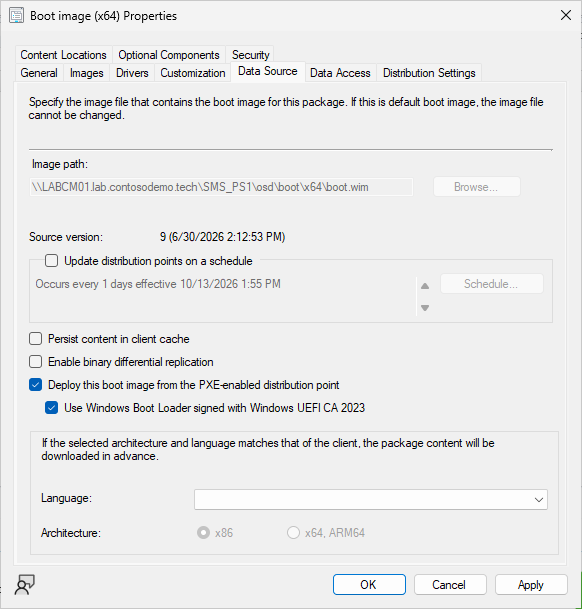
Where the checkbox is
Software Library > Operating Systems > Boot Images > properties of the image > Data Source tab. The box is unchecked by default, including on the built-in boot images and on images created after the upgrade. Checking it and clicking Apply saves immediately. No wizard runs, but a distribution point content update starts on its own.
What it changes
I fingerprinted a fresh boot image before and after checking the box. I compared the package object, the built WIM, the content library object, the staging folder, and the responder log. The table shows every difference.
| Layer | Before | After |
|---|---|---|
SMS_BootImagePackage.PkgFlags | 0x1000400 | 0x1000500, a single new bit: 0x100 |
The built WIM (<image>.<PackageID>.wim) | SHA-256 398BABCA… | Identical. Same hash, same file list. Windows\Boot\EFI\bootmgfw.efi inside it is still PCA 2011 |
| Content library object | 398BABCA… | Same object |
Staged bin\X64\SMSBoot\<PackageID>\x64\bootmgfw.efi | 2,756,512 bytes, PCA 2011 | 2,756,232 bytes, Windows UEFI CA 2023 |
Staged bin\X64\SMSBoot\<PackageID>\x64\wdsmgfw.efi | 1,093,952 bytes, PCA 2011 | 1,093,280 bytes, Windows UEFI CA 2023 |
Everything else in the staging folder (bootmgr.exe, pxeboot.*, fonts, boot.sdi) | Unchanged |
The checkbox is a package flag plus one staging folder. When Configuration Manager expands a PXE-enabled boot image, it copies two files out of the WIM into <ConfigMgr install>\bin\X64\SMSBoot\<PackageID>\<arch>.
With the flag off, it takes Windows\Boot\EFI\bootmgfw.efi and Windows\Boot\PXE\wdsmgfw.efi. With the flag on, it takes the _EX twins from EFI_EX and PXE_EX, which are the same code signed with the 2023 certificate. Those two staged files are what the responder’s TFTP server hands to the client, and nothing else changes.
What this means in practice:
- The checkbox does not reach task sequence media. The Create Task Sequence Media wizard extracts
EFI\bootmgfw.efifrom the WIM, and the WIM is unchanged. Media built from a checkbox-enabled image still carries the PCA 2011 boot manager. The patching post covers the fix. - The staged loaders are only as new as the WIM’s
_EXfiles. The ADK 10.1.26100 ships its 2023 boot manager at Security Version Number 2.0. Its 2023 PXE loader fails a version check on any device that has had KB5025885 Step 3 or Step 4. More on that below.
Per image and reversible
On the responder every PXE-enabled boot image has its own SMSBoot\<PackageID> folder, rebuilt from that image’s own WIM every time the flag changes. I added a second image from an unpatched winpe.wim to a site whose main image was already patched and watched both folders as I checked and unchecked the box:
| Checkbox on the second image | Second image’s folder | Main image’s folder |
|---|---|---|
| off (as created) | 2,756,512 / 1,093,952 (2011) | 3,087,200 / 1,171,224 (2023, patched) |
| on | 2,756,232 / 1,093,280 (2023, ADK level) | unchanged |
| off again | 2,756,512 / 1,093,952 (2011) | unchanged |
Unchecking the box puts the 2011 files back, and no image influences another. That makes a transition image possible. A second boot image with the checkbox off, on its own task sequence deployment, serves the devices that don’t trust the 2023 certificate yet. The responder picks the image by deployment, not by firmware state.
The second image must come from an unswapped winpe.wim and must never be reloaded. Anything built or reloaded from a swapped ADK copy serves 2023 loaders with the checkbox off (see the patching post). The transition image also only works on the responder, because on WDS every client gets the DP’s one shared pair.
Important
The reverse is also true. Once the checkbox is on, every device that does not yet trust Windows UEFI CA 2023 stops PXE booting that image. Know how many of those you have before you check the box.
Proving what the client received
Do not verify inside WinPE. X:\Windows\Boot\EFI\bootmgfw.efi on a booted client is the WIM’s copy, and it reads PCA 2011 whether or not the checkbox is on. It says nothing about the file the firmware executed. Verify on the server, at the layer the client consumes.
1. The staged files. File sizes are a quick way to tell. The 2023 file is smaller than its 2011 twin at the same patch level, by 48 to 280 bytes for the boot manager and 144 to 672 for the PXE loader. The embedded certificate is the real check. Read it from the file’s own signature, not from Get-AuthenticodeSignature. On a host with the same cumulative update installed, that cmdlet returns the catalog signer (PCA 2011) for a 2023-signed file.
$svc = (Get-CimInstance Win32_Service -Filter "Name='SccmPxe'").PathName -replace '^"([^"]+)".*$','$1' # the responder's exe; SMSBoot sits beside it
$Staged = Join-Path (Split-Path $svc) 'SMSBoot\<PackageID>\x64'
Get-ChildItem "$Staged\*.efi" | ForEach-Object {
    [pscustomobject]@{
        File    = $_.Name
        Size    = $_.Length
        Version = [string]$_.VersionInfo.FileVersionRaw
        Signer  = ([System.Security.Cryptography.X509Certificates.X509Certificate2]::CreateFromSignedFile($_.FullName)).Issuer -replace ', O=.*$', ''
        SHA256  = (Get-FileHash $_.FullName -Algorithm SHA256).Hash.Substring(0, 8)
    }
} | Format-Table -AutoSize
The folder sits beside sccmpxe.exe. That is <install>\bin\x64\SMSBoot on a site server that is its own DP, and <drive>\SMS_DP$\sms\bin\SMSBoot on a remote DP. The script finds it from the service rather than the registry, because a DP that used to be a site server keeps a stale copy of the old tree.
Expected with the checkbox on and an unpatched ADK image:
File         Size    Version         Signer                  SHA256
----         ----    -------         ------                  ------
bootmgfw.efi 2756232 10.0.26089.1001 CN=Windows UEFI CA 2023 ...
wdsmgfw.efi  1093280 10.0.26100.1    CN=Windows UEFI CA 2023 ...
With a patched image, both files match the update you applied. The tracker lists the sizes and versions per month. A September 2026 image, for example, stages the boot manager at 3,087,200 bytes, 10.0.28000.367, and the PXE loader at 1,171,224 bytes, 10.0.26100.30227. Use FileVersionRaw, not the FileVersion string (the patching post explains why).
2. The responder log. SMSPXE.log is under <ConfigMgr install>\Logs when the site server is its own distribution point, or under SMS_DP$\sms\logs on a remote DP. The script takes whichever is newest. Every TFTP transfer is logged with its byte count:
$Install = (Get-ItemProperty 'HKLM:\SOFTWARE\Microsoft\SMS\Identification' -ErrorAction SilentlyContinue).'Installation Directory'
$dirs = @(if ($Install) { Join-Path $Install 'Logs' }) + @(Get-PSDrive -PSProvider FileSystem | ForEach-Object { Join-Path $_.Root 'SMS_DP$\sms\logs' })
$log = Get-ChildItem -Path $dirs -Filter smspxe.log -ErrorAction SilentlyContinue | Sort-Object LastWriteTime -Descending | Select-Object -First 1 -ExpandProperty FullName
Select-String -Path $log -Pattern 'BootFile: [^,]|end of file|cannot open|redirected to' | Select-Object -Last 8
BootFile: smsboot\PS10002A\x64\wdsmgfw.efi
TFTP: 10.0.3.161: end of file. 1171224.
TFTP: 10.0.3.161: end of file. 3087200.
TFTP: 10.0.3.161: end of file. 12288.
TFTP: 10.0.3.161: cannot open smsboot\PS10002A\x64\boot.stl.
TFTP: 10.0.3.161: redirected to J:\SCCMContentLib\FileLib\1E3A\1E3AC9CC...
TFTP: 10.0.3.161: end of file. 676670174.
The end of file counts must equal the staged file sizes. The 12,288-byte one is the BCD. The redirected to line is the WIM served by content library hash. The cannot open … boot.stl line is normal. The boot manager asks for it, Configuration Manager never stages it, and the boot carries on.
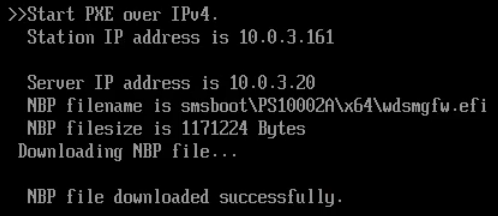
3. The client screen. The UEFI PXE client prints the network boot program’s name and size before it runs it. The lines read “NBP filename is smsboot\PS10002A\x64\wdsmgfw.efi” and “NBP filesize is 1171224 Bytes”, and that size is the same number as the log.
Then the “Loading files” bar, and WinPE starts the task sequence wizard:

The two ways a boot fails, and what they look like
On the test devices I used, a refused signature is silent. The client downloads the network boot program, prints “NBP file downloaded successfully”, and the firmware moves on to its next boot entry. On a machine with a working OS, that means Windows starts and PXE looks as if it was skipped.
There is no “Press ENTER for network boot service” prompt, because that prompt is printed by wdsmgfw.efi itself and the firmware never ran it. In the log you see a completed transfer for wdsmgfw.efi and then nothing.
A refused version is obvious. The loader runs, checks its own version against the firmware’s floor, and stops with a red screen:
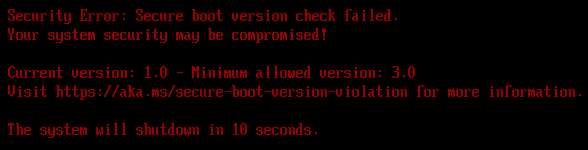
That exact screen, “1.0 vs 3.0”, comes from the checkbox on an unpatched ADK image, booted on a device that has had Step 3 or Step 4. It is the ADK’s 2023-signed PXE loader failing its own version check, before the boot manager behind it was even downloaded.
If you have seen this screen in a forum thread without an answer, this is the cause. The checkbox worked, and the image needs the cumulative update. The Steps 3 and 4 post explains the two version checks in detail.
The checkbox is not required once the WIM is patched
The patching post ends with a two-file swap, which replaces EFI\bootmgfw.efi and PXE\wdsmgfw.efi inside the WIM with their _EX twins. Once that is done, the “2011” and “2023” copies in the WIM are the same bytes, and the checkbox has nothing to choose between. I unchecked it on a patched, swapped image and compared the staged folder. The sizes and hashes were identical, and devices booted exactly as before.
That means the swap works for a Configuration Manager site that is still on 2503 or older. The checkbox is convenient, and it is the only path if you do not patch the WIM. On a patched and swapped image it is not necessary.
The update order
- Patch and swap the ADK
winpe.wim. - Check the box on the boot image (harmless on a swapped WIM, required on an unswapped one).
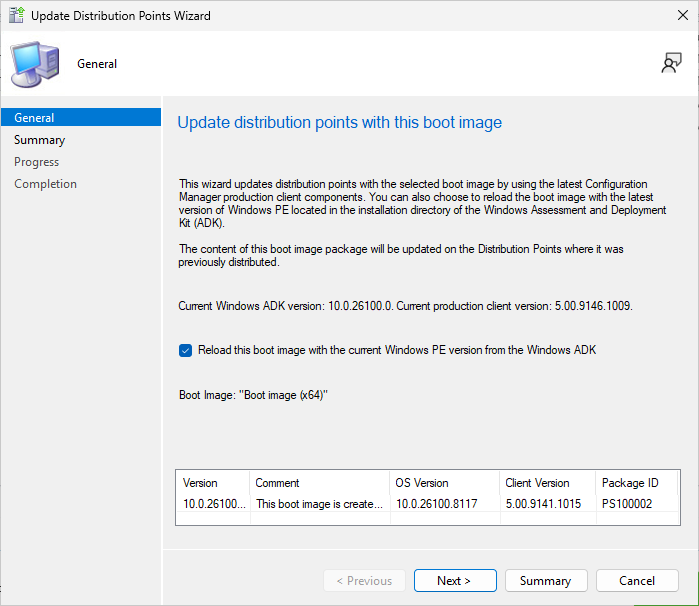
- Right-click the image, Update Distribution Points, and check Reload this boot image with the current Windows PE version from the Windows ADK so the patched WIM replaces the image source. Configuration Manager re-applies the drivers from the Drivers tab, skips optional components already in the WIM, regenerates the built WIM, and re-stages the loaders. Reload reads the
winpe.wimfrom the ADK of the SMS Provider your console uses, not necessarily the site server’s. Patch it on every provider host, and see the patching post for the details. - Verify the staged folder and the log with the commands above, after every reload and not just the first.
- PXE boot one device. If any device already has Step 3, boot that one.
Important
An ADK upgrade, a site upgrade, or a site server move can quietly put the old loaders back. The patching post has the order that avoids it.